



Easy
How to successfully transfer funds from Binance to your bank account today
Have you made profits on Binance and want to withdraw those funds directly to your bank account? The process is easy to understand once you follow the right steps. In this guide, you'll learn exactly how to transfer your earnings from the platform's interface to your bank account, minimizing delays and avoiding common mistakes. We'll detail each step, with key screenshots to help you visualize the process, from account setup to final transaction confirmation. You can then reuse this method whenever you want to convert your cryptocurrencies to euros (or your preferred fiat currency) for transfer to your bank.
Table of Contents
Transferring funds from binance to your bank account: Check your eligibility before making any transfer
Before initiating a binance transfer to a bank account , ensure you meet certain requirements imposed by the platform. Financial transactions on Binance are monitored to guarantee everyone's security.
– verified Binance account : You must have completed the KYC (Know Your Customer) process by submitting your identity documents. This step allows you to remove your withdrawal limits and proves that you are indeed the account holder.
– Have an active bank account : The receiving account must be valid, with a correct IBAN or account number. Also, make sure you have already made a deposit or withdrawal from this account if the platform requires it (this is sometimes the case to verify the link between your bank and Binance ).
– Check regional restrictions : Some countries or regions may have specific regulations for fiat currency transfers. Make sure you are familiar with the rules in your area.
If these conditions are met, you are ready to make a withdrawal.
More information about the rewards can be found here.
Step 1 – Access the Withdrawal section
The first thing to do is to go to your dashboard. Once logged in, you will see a menu at the top of the interface (on a computer) or at the bottom (on a mobile app).
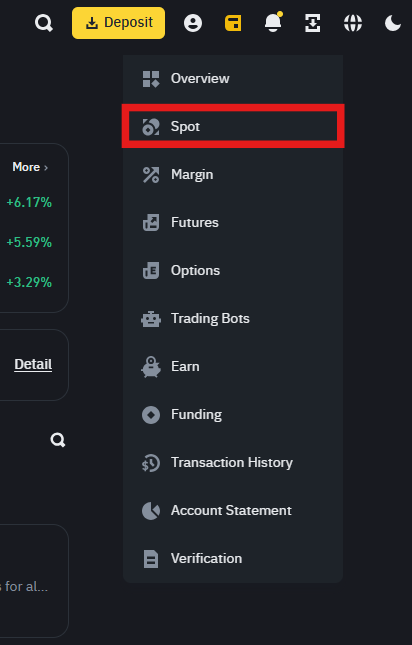
By hovering over or clicking on "Wallet," you will see several options:
– The "Spot Wallet" contains most of the cryptocurrencies you hold for spot trading.
– The "Fiat and Spot" tab allows you to view both traditional currencies (EUR, USD, GBP, etc.) and your cryptocurrencies.
Next, click on "Withdrawal" (or "Withdraw" depending on the language you have chosen) to access the main withdrawal page.
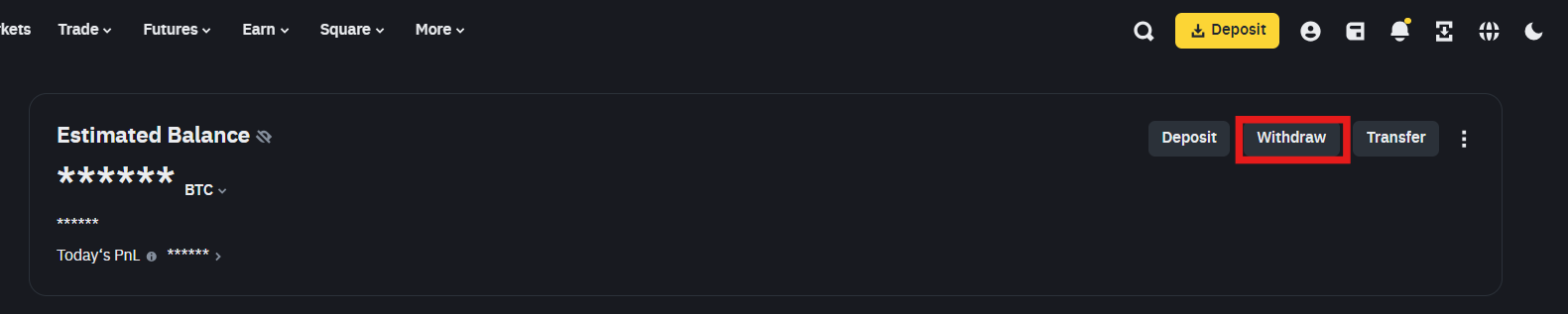
Step 2 – Select the currency to withdraw and the withdrawal method
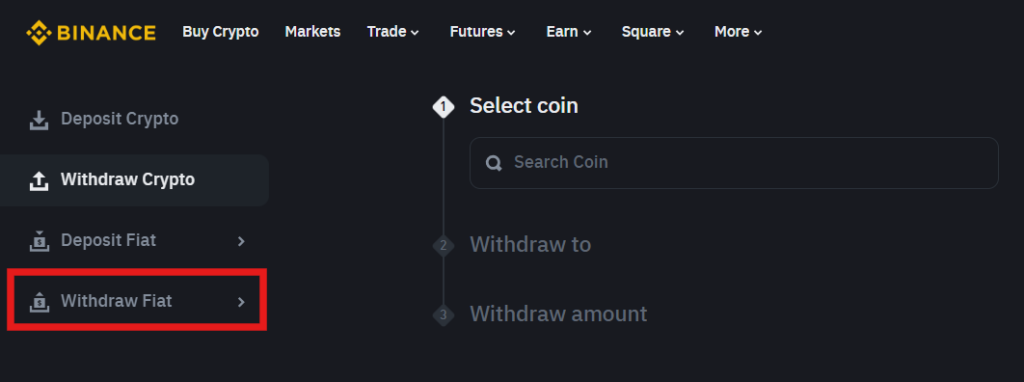
On the withdrawal page, you have two main tabs:
- Crypto withdrawal : if you want to send digital assets (Bitcoin, Ethereum , USDT …) to an external wallet.
- Fiat withdrawal : to send money directly to your bank account.
Since you want to make a binance transfer to a bank account , you will need to choose the section corresponding to fiat currency (for example, the euro).
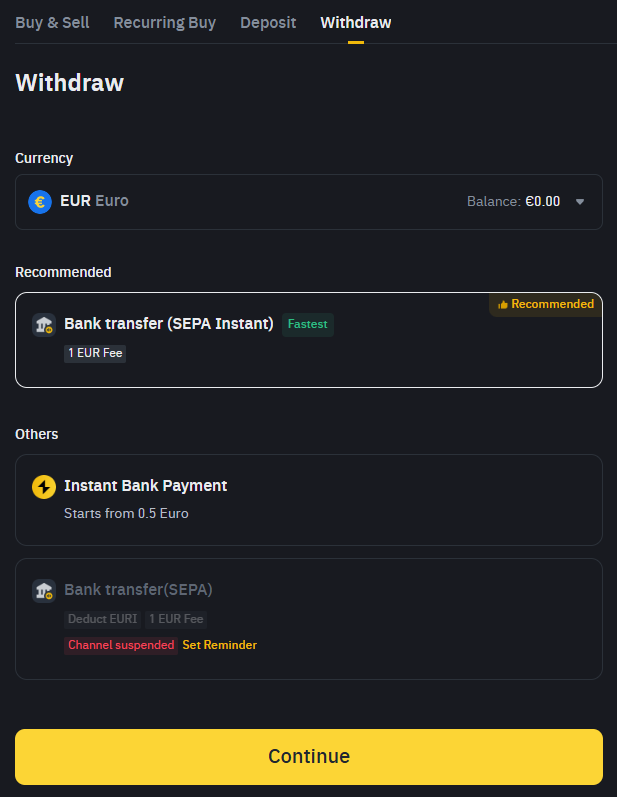
By clicking on "EUR" (or any other currency you use), Binance will ask you to specify your preferred withdrawal method. Binance then offer several withdrawal methods, organized into two sections:
- Recommended :
- Instant SEPA bank transfer (€1 fee) → Fastest method.
- Other options:
- Instant bank payment (fees from €0.50).
- Standard SEPA bank transfer (€1 fee) → Currently suspended according to the screenshot.
👉 Select the "Bank transfer (SEPA Instant)" option , which is recommended and the fastest.
💡 Note:
If you see the message "Channel suspended" on a standard SEPA transfer, this means that this method is temporarily unavailable. In this case, choose SEPA Instant or another available alternative.
Once you have selected your withdrawal method, click "Continue" to proceed to the next step.
In the case where you are withdrawing a large sum, SEPA may be more economical, while for a small amount, some users prefer bank payment.
Step 3 – Check and configure your payment method
Once you have chosen the currency, you will see a drop-down menu for the payment method:
- Bank Transfer (SEPA) : You will need to provide or confirm your IBAN and the name of the bank, and possibly the SWIFT/BIC for international transfers.
- Visa card : If you have never added a card, you will need to register it for the first time.
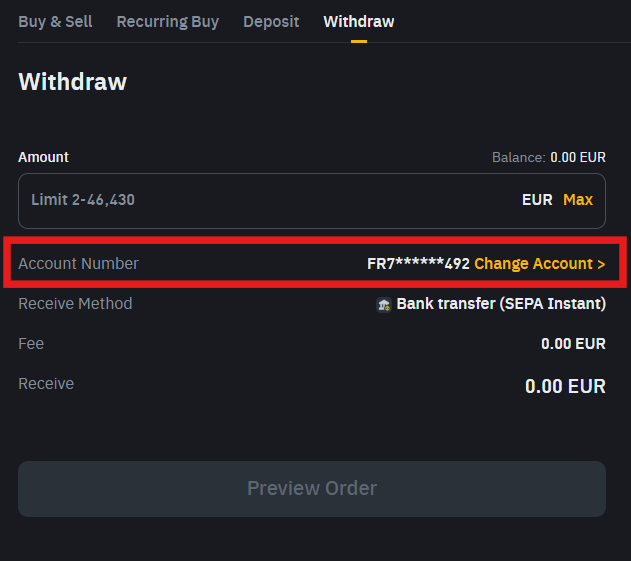
Some users report that a previous deposit via bank transfer is required before withdrawals. Binance implements this requirement to ensure the card or account belongs to the same person. If you've never deposited funds from your bank, consider making a small test deposit (1 euro, for example) to complete the bank connection.
Step 4 – Enter the withdrawal amount
Once the method is validated, you will need to specify the amount to withdraw. Pay attention to the minimum amount imposed by the platform or bank. The minimum for a SEPA transfer on Binance is €2, and card withdrawals may have a similar minimum amount.
Always check the summary provided:
– Total amount.
– Fees applied.
– Net amount you will actually receive.
Some user feedback indicates that these fees may fluctuate slightly depending on variations in the banking network. If you notice a discrepancy, refresh the page or contact Binance support to verify the fee structure.
Step 5 – Proceed with security (2FA, codes, etc.)
Binance takes security very seriously. To validate your binance transfer to your bank account , you will often need to go through:
- Two-factor authentication (2FA) : via Google Authenticator or SMS.
- Email confirmation code : an email will be sent to ensure that the request is indeed from you.
According to an internal report published by Binance Security in 2024, over 98% of fraud attempts are blocked thanks to multi-factor authentication. Therefore, be sure to keep your phone or code generator handy when making a withdrawal.
Step 6 – Wait for the transfer to be processed
Once the transaction is validated, Binance typically processes the request within a few minutes (for a card withdrawal) to several hours (for a SEPA transfer). Your bank then takes over. As mentioned earlier, most banks process SEPA transfers in less than 24 hours, although it's advisable to wait up to 72 business hours in some cases.
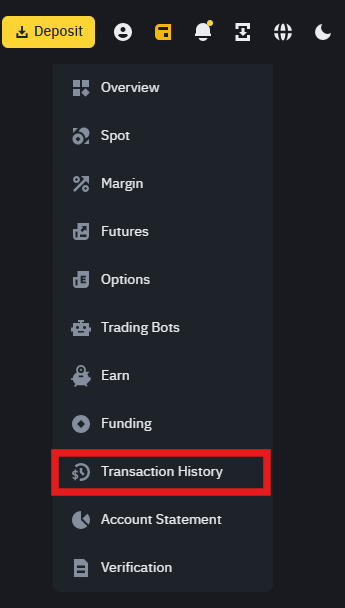
Please be patient. If you don't see any changes after a few days, first check your bank statement. If the transfer still hasn't arrived, log in to your Binance account and review your withdrawal history. Each transaction is listed there, along with a status (completed, pending, declined).
It's also possible that the bank may block a transfer for verification purposes. In this case, contact your advisor or the bank's customer service department to confirm the source of the funds.
Transferring funds from binance to your bank account: Advanced techniques and practical tips
Once you understand the basic logic, you can optimize your withdrawals in several ways.
Schedule your withdrawals to avoid network peaks
During periods of high volatility in the cryptocurrency market, the number of transactions increases. This can slow down services, including crypto-to-fiat conversions. Scheduling your withdrawal when activity is lower can save you time and help you avoid high fees.
Furthermore, according to a study published by CryptoCompare at the end of 2023, trading volume on Binance can double during major economic announcements, sometimes making the interface slower.
Convert your cryptocurrencies at the best times
To transfer funds binance to a bank account , you generally need to exchange your cryptocurrencies for fiat currency. On Binance , you can:
– Use the "Convert" function : simple and instant, though the spread may be slightly higher.
– Place a spot order : by placing a limit or market order on the crypto/EUR pair (e.g., BTC /EUR).
To reduce costs, monitor the price. Some traders prefer to sell their cryptocurrencies outside of peak hours to get a better rate and a lower spread. Others place a limit order to buy or sell at the exact price they want to reach.
Be aware of withdrawal limits
Binance offers several withdrawal tiers:
– Basic verification level : relatively low limits.
– Verified level : higher limits, sometimes several thousand or tens of thousands of euros per day.
– Verified Plus level : withdrawals can be very high, depending on the region and the documentation provided.
Before transferring a large amount, check your withdrawal limit. This will prevent multiple transactions or unpleasant surprises when you try to confirm the transaction.
Securing your personal data
When entering your bank details, take the time to ensure they are correct. A simple typo in the IBAN can delay the transaction by several days, or even cause the withdrawal to fail.
– Keep a copy of your IBAN in a safe place.
– Avoid performing this operation on an unsecured public Wi-Fi network.
– Activate all possible security measures, such as SMS verification and identity authentication.
According to the CNIL (French Data Protection Authority), most bank data breaches stem from human error (incorrectly entered information, use of unsecured devices, etc.). Increased vigilance protects your money.
Binance transfer to bank account: fees and processing times depend on your withdrawal method
Withdrawal fees are a key factor to consider when maximizing your earnings. Here are the costs based on the options displayed on your Binance interface:
- SEPA Instant Transfer : €1 fixed fee , immediate transfer if the receiving bank supports SEPA Instant.
- Instant bank payment : From €0.50 , but depends on the agreements between Binance and your bank.
- Standard SEPA transfer : Usually €1 fee , but currently suspended .
Processing times
- Instant SEPA Transfer : Execution in seconds if your bank supports it.
- Instant bank payment : May be immediate or take a few minutes , depending on the receiving bank.
- Standard SEPA transfer (if reactivated): Generally 1 to 2 working days .
A survey conducted by the website EuroPaymentsSurvey.org in 2022 reveals that 78% of European banks process SEPA transactions in less than 12 hours, but they often prefer to announce a delay of up to 72 hours to protect themselves against any technical incident.
Transferring funds from binance to your bank account: Frequently asked questions about transferring funds to a bank account
What should I do if I don't receive my funds?
– Check the transfer status on Binance : Log in, open your withdrawal history, and see if the status is "pending" or "completed."
– Check your bank statement : In rare cases, a delay of 3 to 5 days may apply, especially if you are making a cross-border transfer (outside the SEPA zone).
– Binance support : If the status is "completed" but the money doesn't appear after 7 days, open a support ticket.
– Contact your bank : Some banks may block funds from crypto exchanges as a precaution, especially if the amount is unusual compared to your account history.
Is there a minimum withdrawal amount?
Binance often imposes a minimum amount (10 euros on average) for a SEPA transfer. For a bank card withdrawal, the minimum may be higher or vary depending on the region.
– If you have less than this minimum, you will need to convert more crypto or wait until you accumulate more funds.
Can I withdraw a currency other than the euro?
Binance supports multiple currencies (USD, GBP, etc.). However, SEPA is only valid for euro-using zones. If you reside in the UK, you will need to withdraw in GBP using other methods or a UK-compatible bank transfer. Binance
USD withdrawals, you will need to use payment networks like SWIFT, which sometimes charge higher fees.
Transferring from binance to your bank account: Steps to convert your crypto to fiat
Before sending the money to the bank, you need to convert your cryptocurrencies. Users can:
- Sell directly on the Spot market : place a sell order on the crypto/EUR pair.
- Use the Convert system : Binance shows you the market price, you confirm with one click.
Once your cryptocurrencies are sold, your EUR balance will be displayed in the "Fiat and Spot" section. You can then follow the withdrawal steps as explained previously.
It is crucial to note that the conversion rate fluctuates constantly. According to CoinMarketCap, Bitcoin has an average spread that can exceed 0.10% on the largest platforms. On Binance, this spread is generally lower, but it can vary depending on market volatility.
Transferring funds from binance to your bank account: Security checklist before clicking "Confirm"
- Correct amount : check you haven't inadvertently added a zero.
- Bank address : the IBAN must be correct, as must the name of the beneficiary.
- Network compatibility : In some cases, if you are withdrawing a currency other than the euro, check the network chosen (SEPA, SWIFT, etc.).
- Payment method chosen : you have correctly selected SEPA bank transfer or Visa card, according to your preference.
- Two-factor authentication enabled : Google Authenticator or SMS, plus an email code to secure the transaction.
Transferring funds from binance to your bank account: A few words about alternatives to traditional bank transfers
If you do not wish to send your euros directly to your bank account, other solutions exist:
– P2P withdrawal : You sell your crypto to other users in exchange for payment via PayPal, direct bank transfer, or other methods. This peer-to-peer approach can be fast and sometimes cheaper, but requires a good understanding of how P2P works and choosing a reliable buyer.
– Binance Card : The platform offers its own card, allowing you to spend your crypto in everyday life. The balance is deducted from your Binance without going through a traditional bank transfer.
– Transfer to another exchange : If you prefer another exchange that offers a better rate or lower fees, you can first transfer your crypto to that other platform and then withdraw it there. However, check whether network fees will negate any savings.
Transfer from binance to your bank account: Summary and final recap
To successfully transfer funds binance to your bank account with complete peace of mind, here are the essential points to remember:
– Verify your account : KYC , accurate bank details, and appropriate withdrawal limits.
– Choose the right method : SEPA for lower fees, Visa for faster processing.
– Calculate the costs : consider the spread when selling your crypto and any potential withdrawal fees.
– Follow the steps : convert your crypto to fiat currency, enter the amount, authenticate, validate, and track the transaction.
– Anticipate the processing time : up to 72 hours for a SEPA transfer, potentially instant for a card withdrawal.
– Keep proof : withdrawal history, bank statements, screenshots, and confirmation emails.
By doing so, you ensure that your money arrives smoothly and as quickly as possible. According to testimonials gathered by the analytics firm Glassnode, Binance 's reliability for fiat withdrawals has increased significantly in recent years thanks to multiple banking partnerships and a continuous strengthening of KYCprocedures.
Conclusion on a transfer from Binance to his bank account
Transferring funds binance to a bank account becomes incredibly easy when you follow the steps and checks outlined in this guide. The key to success lies in accuracy: verify your IBAN, choose the most suitable payment method, and secure your account in every possible way. Each step can be confirmed by a quick glance at your screenshots, withdrawal history, and confirmation email.
Furthermore, if you develop good habits (entering the exact amount, monitoring cryptocurrency volatility, checking the fees applied), you will be able to collect your earnings quickly and safely, leaving no room for doubt.
If you still have questions, feel free to consult Binance 's official documentation or contact their customer support. The rules evolve over time, especially with the rapid expansion of the cryptocurrency market and its regulations. But for now, you have all the basics you need to successfully complete your transfer and finally see your bank balance reflect your crypto profits.
Cryptocurrency investments are risky. Crypternon cannot be held liable, directly or indirectly, for any damage or loss resulting from the use of any product or service mentioned in this article. Readers should conduct their own research before taking any action and only invest within their financial means. Past performance is not indicative of future results. This article does not constitute investment advice.
Some links in this article are referral links, which means that if you purchase a product or sign up through these links, we will receive a commission from the referred company. These commissions do not incur any additional cost to you as a user, and some referrals give you access to promotions.
AMF Recommendations. There is no guaranteed high return; a product with high potential returns implies high risk. This risk must be commensurate with your investment goals, your investment horizon, and your ability to lose some of your savings. Do not invest if you are not prepared to lose all or part of your capital .
To learn more, read our Legal Notices , Privacy Policy and Terms of Use .

Yoann
Trained as an engineer, I quickly became interested in the field of finance. Convinced that decentralized finance has a bright future, I am participating in its democratization by developing Crypternon.