

Easy
How to trade on Coinbase : A complete guide
Want to know effectively and securely on Coinbase the trading platform interface . Whether you're a beginner or experienced trader, you'll discover the steps to start placing orders, as well as more advanced features like access to Coinbase Advanced and its options for futures and perpetual . We'll also discuss transaction fees , which can sometimes be high, and the available alternatives to optimize your budget.
Table of contents
How to trade on Coinbase : a platform overview
Coinbase is among the leading platforms when it comes to crypto markets . Founded in 2012, the company has established itself as a reliable player, compliant with regulations and offering a beginner-friendly environment. Users particularly appreciate:
- A clear and simplified interface for buying /selling cryptos .
- A high level of security (e.g. KYC and two-factor authentication).
- A wide range of cryptocurrencies .
- Learning tools and accessible customer support.
However, Coinbase isn't necessarily the cheapest platform in terms of transaction fees . For a more in-depth comparison, you can consult our cryptocurrency platform fee comparison . That said, if you still choose Coinbase, here's how to trade on Coinbase and what features you should know (but most features are the same for all platforms).
How to trade on Coinbase : Registration and account creation
To begin, you must register. This step is essential to use the platform's services. It takes place in several phases:
- Initial registration : Go to the official website or mobile application. Enter your information (email address, password, etc.) and then submit.
- KYC Verification : Coinbase requires identity verification by uploading an official document (ID card or passport). This procedure enhances security and legal compliance.
- Add a payment method : choose between bank card, SEPA transfer, or PayPal. Cards are faster but often have higher fees; transfers are cheaper but slower.
Once these formalities are completed, you will have access to your online crypto wallet a screenshot Coinbase homepage during account creation to better visualize each step.
Basic interface: Buying and selling cryptocurrencies
Coinbase 's main interface is designed to simplify buying and selling cryptocurrencies . A few clicks are all it takes to acquire tokens at the market price. Here's how:
- Log in to your account and select “Buy/Sell”.
- Choose the cryptocurrency you want (Bitcoin, Ethereum , etc.).
- Indicate the amount in euros (or dollars) that you wish to invest .
- Confirm the transaction after verifying the transaction fees .
That's it. In a few seconds, your cryptocurrencies appear in your Coinbase crypto wallet . To sell them, the process is similar, but you select "Sell" instead of "Buy." Simple and effective, this basic module provides a good introduction to the crypto markets without getting bogged down in overly advanced features.
How to trade on Coinbase : Discover Coinbase Advanced, the advanced interface for trading
While the initial interface is suitable for beginners, it quickly becomes limited when you want to use technical analysis or place stop-limit orders . This is where Coinbase Advanced , the successor to the former Coinbase Pro .
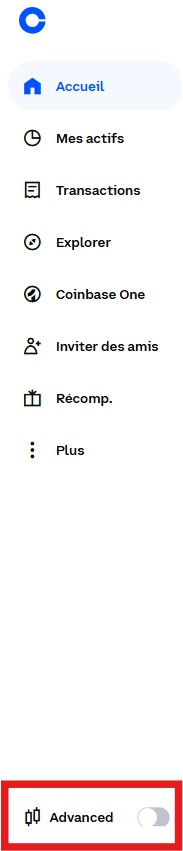
Accessible from your account, this more advanced interface offers:
- An TradingView chart , where you can apply indicators (RSI, MACD, Bollinger bands, etc.).
- Real-time visualization of the order book and order history
- The ability to place stop-limit or “trailing stop” orders with advanced parameters.
- Information on liquidity and potential slippage
Order types available on Coinbase Advanced
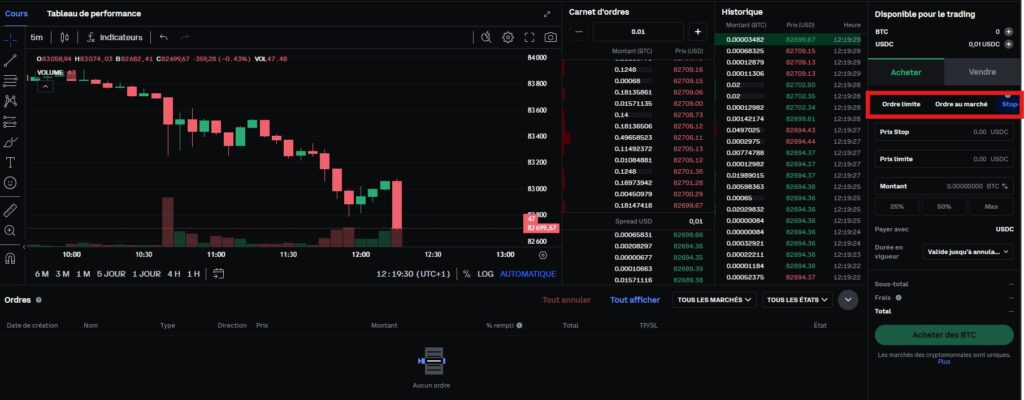
Coinbase Advanced isn't limited to buying/selling at the market price. You benefit from a variety of order types to optimize your entry and exit points:
- Market order: the order is executed immediately at the best available price, ideal for quick entry or exit.
- Limit orders: you define a specific price at which the order must be executed. Perfect for precisely controlling your investment budget.
- Stop-limit orders: combine a trigger price (stop) and a limit price. Useful for protecting against sharp price fluctuations or for implementing a stop-loss.
Spot, perpetual and futures contracts: Understanding the difference
In addition to the "classic" ( spot ) market, some platforms offer derivative products , such as futures or perpetual . Historically, Coinbase focused primarily on spot trading, but with the advent of Coinbase Advanced , more sophisticated solutions are emerging to allow the use of leverage or short positions.
- Spot trading : you actually buy and hold cryptocurrencies . Profits or losses depend on the price of the asset you own.
- Futures contracts : you commit to a future price for an asset, with a defined expiry date. This allows you to hedge or speculate on larger price fluctuations, sometimes using margins .
- Perpetuals : similar to futures contracts, but without a fixed expiry date. Their price is adjusted via funding mechanisms to match the spot price.
Coinbase has gradually introduced perpetual bond offerings for some clients, but these features remain limited depending on the region and local regulations. Therefore, check if your country allows these tools. For example, it is currently impossible to trade perpetual bonds in France on centralized exchanges.
To do this, you will need to use decentralized trading platforms like Drift and DYDX ( Drift and DYDX fees Drift it is recommended to use an online wallet (hot wallet ) such as Metamask , Trust Wallet , Exodus, etc.
To learn how to use a decentralized wallet, we offer our free, step-by-step guide, with supporting screenshots.
What you will learn:
✔ Mastering a decentralized wallet ( DeFi ) – Learn how to manage your assets without intermediaries and interact directly with the blockchain.
✔ Transacting via a decentralized wallet – A practical guide to trading cryptocurrencies independently.
✔ Exploring decentralized finance ( DeFi ) – Discover advanced concepts like staking and NFTs .
📥 Download the guide freely by filling out the form below:
To illustrate the setup of a perpetual contract or a position on derivative products , you can include a screenshot of the derivatives contracts interface if you have access to it.
How to trade on Coinbase : Coinbase fees , How to optimize your costs?
On the basic version of Coinbase , transaction fees can reach several percent, which is still high. Orders on Coinbase Advanced generally use the so-called maker-taker fee (a system inherited from Coinbase Pro ), where:
- The maker (the one who adds liquidity to the order book ) pays less in fees, or is even paid in rare cases.
- The taker (the one who immediately takes the liquidity ) bears a higher rate.
For some users, total fees can range from 0.1% to 0.5%, depending on their monthly volume and status. It's important to compare these figures with other platforms: many competing exchanges offer more attractive rates. Therefore, feel free to consult our " Comparison of Fees for Major Cryptocurrency Platforms " to determine if Coinbase remains the most advantageous option or if you should diversify your trading elsewhere.
A concrete example of a cost structure
day trading volume of around $8,000 per month. On Coinbase Advanced, they can benefit from a "maker" rate of around 0.35% and a "taker" rate close to 0.75%.
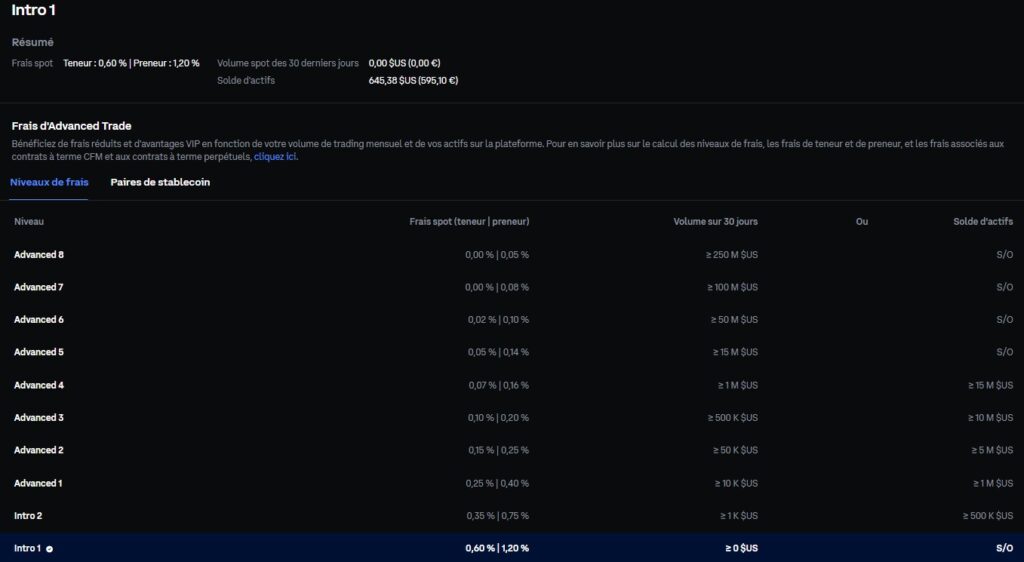
On other platforms, these rates can be half as much or even less. The impact on your profitability becomes considerable when you place a series of orders, especially for scalpers or swing traders .
How to trade on Coinbase : Implementing a coherent trading strategy
Having access to advanced features isn't everything. To generate profits, you need a robust strategy and clear objectives. Here are a few suggestions:
1. Choose your trading style
- Scalping : you accumulate many small gains by profiting from very frequent micro-fluctuations. Fees can quickly add up.
- Day trading : you open and close your positions in the same day, reducing your exposure to overnight risk.
- Swing trading : you hold a position for several days or weeks to capture a fundamental movement, while avoiding an excess of orders.
2. Utilize technical analyses
- Use the TradingView chart to spot patterns (Triangle, Double Top, Head and Shoulders, etc.).
- Monitor indicators such as RSI, MACD or moving averages to identify overbought or oversold zones.
-
Use visual tools like Crypto Bubbles to quickly identify assets that are outperforming or underperforming over different time periods. This allows you to spot anomalies, potential reversals, or simple overbought moves.
- Relying on the index (available on specialized websites) to assess overall market sentiment, even though this data remains indicative.
3. Manage risks and set objectives
- Define a stop-loss and a take profit for each position, so you know in advance when to cut your losses or cash in your profits.
- Split your investments. Avoid putting all your eggs in one basket.
- Limit the use of leverage : even though Coinbase Advanced margin products , it is easy to amplify your losses.
Always prioritize long-term consistency over the pursuit of quick gains, especially in an environment where volatility can be extreme.
How to trade on Coinbase : Keeping your cryptocurrencies safe
Even though Coinbase is known as a trading platform , it's advisable to transfer your funds to an crypto wallet (often called a wallet) when you're not trading. Two main options:
- Cold wallet Ledger or Trezor type ): you physically hold your private keys , offline.
- Software wallet : an application on your computer or smartphone, controlling your private keys.
Holding too many assets on an exchange exposes you to the risk of hacking or regulatory blocks. Therefore, secure your holdings for the long term. Coinbase also offers its own wallets, but having full control of your keys remains an additional guarantee of security.
How to trade on Coinbase : Advanced user guide, Practical steps for placing a complex order
If you're new to Coinbase Advanced , here's a simple step to place a limit order with a stop-loss :
- Log in to your Coinbaseaccount, then select “Coinbase Advanced” from your dashboard.
- Choose the desired trading pair (e.g. BTC /EUR) from the list of crypto markets .
- Locate the TradingView chart to define your target price by analyzing support and resistance levels.
- Below the order form, select “Limit”. Enter the maximum price at which you want to buy (or sell).
- Activate the stop-limit if you wish to protect your position. You will need to define a trigger price ( stop ) and a limit price.
- Check the maker-taker fees applied based on your current status.
- Confirm your order. It will appear in the order history , pending execution until the price reaches your target price.
If you anticipate a rapid price movement, opt for a market order for instant execution. However, remember that you will pay a higher taker
How to trade on Coinbase : Tracking and optimizing your trading
Once your positions are open, you can view and adjust them from the order history or the "Portfolio" in the Coinbase . There you will find:
- The quantity of tokens held and the total value in euros.
- Orders currently being executed (limit or stop-limit not filled).
- The ability to change the price of an order or cancel a pending order.
To track overall performance, you can also export your history and perform your own analyses using a spreadsheet. Many traders calculate their profitability by including the total amount of transaction fees paid, in order to determine whether it's more advantageous to stay on Coinbase or reduce these fees by switching to a competitor.
For example, feel free to consult our comparison of fees between Binance and Coinbase to better assess the differences based on your trading volume.
Conclusion on how to trade on Coinbase
Knowing how to trade on Coinbase or another platform opens the door to a vast and dynamic crypto ecosystem. The combination of an intuitive interface and advanced features through Coinbase Advanced makes it a popular choice, especially for beginners who later want to progress to more technical options. However, its transaction fees can be a deterrent if you engage in intensive day trading scalping . In this case, comparing different exchanges remains essential to optimize your costs.
Investments in cryptocurrencies are risky. Crypternon could not be held responsible, directly or indirectly, for any damage or loss caused following the use of a property or service put forward in this article. Readers must do their own research before undertaking any action and investing only within the limits of their financial capacities. Past performance does not guarantee future results. This article does not constitute an investment advice.
Certain links of this article are sponsorship links, which means that if you buy a product or you register via these links, we will collect a commission on the part of the sponsored company. These commissions do not train any additional cost for you as a user and certain sponsorships allow you to access promotions.
AMF recommendations. There is no guaranteed high yield, a product with high performance potential implies a high risk. This risk taking must be in line with your project, your investment horizon and your ability to lose part of this savings. Do not invest if you are not ready to lose all or part of your capital.
All our articles are subject to a rigorous verification of the facts. Each key information is verified manually from reliable and recognized sources. When we cite a source, the link is systematically integrated into the text and highlighted by a different color, in order to guarantee transparency and allow the reader to consult the original documents directly.
To go further, read our pages legal notices , privacy policy and general conditions of use .

Yoann
Training engineer, I quickly became interested in the field of finance. Convinced that decentralized finance has a bright future ahead of it, I participate in its democratization by developing Crypternon.