

Easy
Crypto Staking on Ledger : how does it work and how to get started?
Ledger crypto staking allows you to generate passive income by using your Ledger wallet to secure cryptocurrencies. But how exactly does it work, and how can you get started quickly? Here's everything you need to know staking
Table of contents
What is crypto staking with a Ledger ?
Crypto staking staking the act of locking up a quantity of cryptocurrency on a blockchain using a consensus mechanism called Proof of Stake Stake ( PoS ). In exchange for this contribution to the security and validation of network transactions, participants receive staking rewards , usually in native cryptocurrency.
When you use a hardware wallet like the Ledger Nano , you retain exclusive control of your funds: the private keys never leave the device. Ledger Ledger models, as staking is done via Ledger Live in the same way for Ledger models .
The role of validators in staking
To understand staking, it's essential to know the central role of validators. On a Proof-of-Stake blockchain, they are the ones who propose and validate new blocks. In return, they receive a portion of the transaction fees and/or newly issued cryptocurrency units (depending on the network's monetary policy).
If you don't want to run a node yourself (which requires considerable technical and financial resources), you can simply delegate your tokens to a validator. This allows you to participate indirectly in the process while retaining ownership of your cryptocurrencies. This is how the vast majority of users participate in staking .
Rewards and penalties: what you need to know
Here are the two sides of staking :
- Rewards : These vary depending on the network, the amount wagered, and the validator's performance (uptime, number of blocks validated, etc.). They can be paid out daily, every 72 hours, or at the end of a period, depending on the blockchain.
- Sanctions ( slashing ): if the validator acts maliciously or does not stay online, a portion of the staked funds may be penalized .
Delegating does not mean relinquishing ownership of your funds. What you are delegating are your participation rights (voting, validation) to the validator. Your private keys remain on your Ledger wallet . You can stop staking and withdraw your funds at any time, depending on the reverse delegation specific to each blockchain (from a few hours to several days).
Minimum amounts required according to blockchains
Each network has its own rules for staking. Here are some concrete examples:
- Ethereum (ETH) : 32 ETH to be a validator, but you can delegate any amount via providers in Ledger Live.
- Solana (SOL) : no strict minimum, but it is advisable to keep at least 0.01 SOL unstaked for fees.
- Polkadot (DOT) : often a minimum of 10 DOTs for delegation according to the validators.
- Tezos (XTZ) : no official minimum for delegation.
- Cosmos (ATOM) : generally from 0.05 ATOM, but depends on the validator.
This information is visible directly in the Earn of Ledger Live , which adapts the interface to the selected crypto.
Why do staking with Ledger ?
Here's what distinguishes staking via a Ledger from centralized exchange platforms ( CEX ) like Binance or Bitvavo:
- Personal custody : you are the only one with access to your assets via the Ledger .
- Free choice of validator : via Ledger Live, you choose who to delegate to ( Ledger by Figment, Lido, Stader, etc.).
- Total transparency : commission fees are clearly displayed and generally lower than on CEX.
- Less centralized risk : you are not dependent on the solvency of a platform, as has been the case with FTX or Celsius.
How does staking work on Ledger Live?
Ledger Live makes it easy to manage your digital assets and participate in staking independently. You freely choose validators to maximize your earnings and manage your assets directly from the app.
Assets supported by Ledger Live for staking
Several popular cryptocurrencies are compatible with Ledger Live:
- Ethereum (ETH) – APR approximately 2.98%
- Solana (SOL) – APY approximately 8.61%
- Cosmos (ATOM) – APY around 19.01%
- Polkadot (DOT) – APY around 10.66%
- Osmosis (OSMO) – APY around 24.00%
- Others: Cardano (ADA) , Tezos (XTZ) , Avalanche (AVAX) , Injective (INJ) , etc.
Each asset offers a different interface for delegating your tokens to a validator.
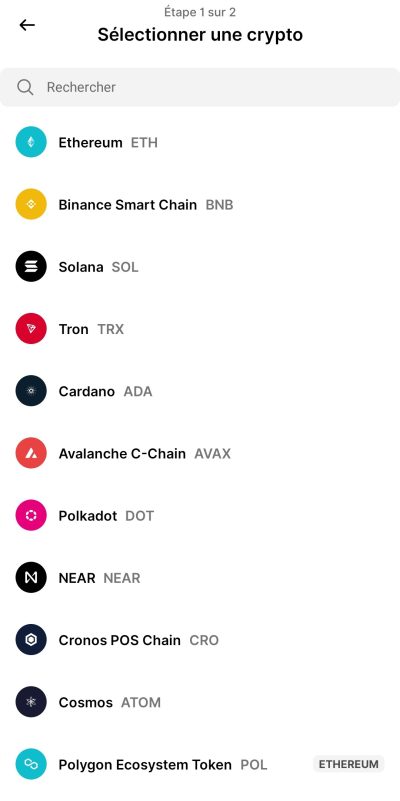
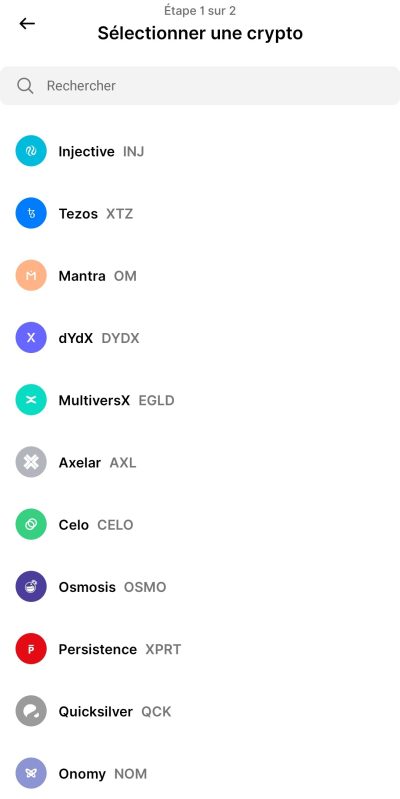
Example with Solana : How to stake your Solana (SOL) with Ledger Live
Here's a detailed guide to staking your SOL via your Ledger . Add screenshots to the steps outlined below for easier understanding:
Step 1: Prepare your Ledger
- Connect your Ledger at Ledger Live.
- Install or update the Solana on your Ledger .
Step 2: Transfer your SOL to your Ledger wallet
- From an exchange or another wallet, transfer your SOL to the address provided by Ledger Live.
- Please wait a few minutes to confirm the transaction.
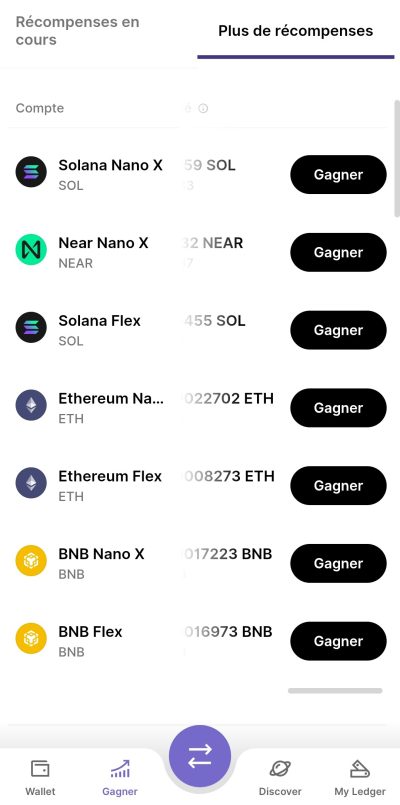
Step 3: Start staking via Ledger Live
- Go to the Earn on Ledger Live.
- Select Solana , then click on your account and then "Delegate to earn rewards".
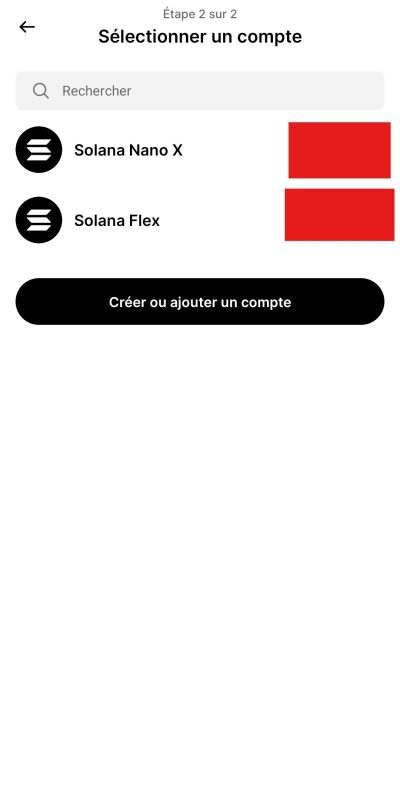
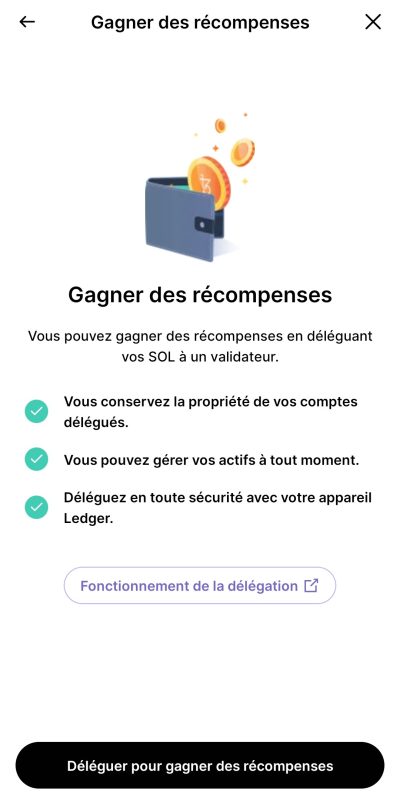
Step 4: Choose a validator
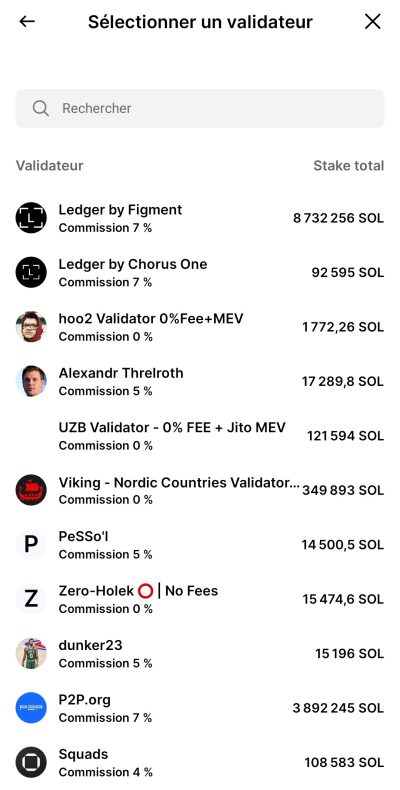
In this step, you must select a validator to whom you will delegate your participation rights.
Each validator takes a commission, expressed as a percentage, which corresponds to the portion of the rewards they retain to compensate for their service. For example, " Ledger by Figment (commission: 7%)" means that this validator retains 7% of the generated earnings before paying you the remainder. This fee is automatically deducted and requires no action on your part.
To choose a reliable validator, consider the following criteria:
- Commission rate : a reasonable rate, neither too high nor too low (often between 5% and 10%).
- Uptime rate : A validator who is constantly online is more likely to receive regular rewards.
- Penalty history : avoid validators who have been "slashed" for mistakes or inactivity.
- Reputation : favor validators known and supported by recognized entities such as Ledger by Figment .
Note that most users generally choose large validators with a large organization behind them without really doing any research in order to speed things up. However, if you want to do further research, here's where to find them:
Where can I find key information about validators?
- Commission rate : - In Ledger LiveWhen you select an asset (e.g., Solana, Ethereum, Polkadot…), the available validators are displayed with their commission rate indicated as a percentage. – For more details, you can consult specialized blockchain explorers such as:
- solana beach.io for Solana
- mintscan.io for Cosmos
- polkadot .js.org for Polkadot
- Uptime rate : – Displayed directly in the validator explorers mentioned above. – The uptime rate reflects how consistently a validator remains connected and operational. An uptime close to 100% is ideal.
- Penalty history (slashing) : – This information is usually available in the validator details on blockchain explorers. – A validator who has been "slashed" has been penalized (e.g., double signing, prolonged inactivity), which can affect your rewards or even lead to a partial loss of delegated funds.
- Reputation : – Check if the validator is associated with a known organization (e.g. Figment , Ledger , Binance , etc.).
Select the validator you trust, then click "Continue" to proceed to the next step.
Step 5: Confirm the delegation
- Choose the amount to delegate (keep approximately 0.01 SOL available for expenses).
- Confirm the transaction with your Ledgerdevice.
Step 6: Check your staking rewards
- Your rewards will appear directly in your staked balance approximately 2-3 days later.
- Easily track them in the Earn tab of Ledger Live.
(Screenshot to be inserted: Tracking rewards in Ledger Live)
Differences between staking on Ledger and exchange platforms
Unlike platforms like Binance :
- With Ledger , you retain total control of your assets thanks to your private keys .
- You choose your validator, which is not possible on most centralized exchanges (CEX) .
- Ledger does not charge any hidden additional fees.
Risks and precautions associated with staking with Ledger
Even with a physical wallet:
- staking always carries risks related to network performance.
- Do not delegate all of your assets in order to be able to pay potential transaction fees.
- Always choose recognized validators.
Conclusion: Is Ledgercrypto staking an effective solution?
Crypto staking via a Ledger wallet is an excellent way to generate passive income while maintaining complete control over your crypto. Ledger Live significantly simplifies staking management and maximizes security by keeping your private keys on your personal device.
Crypto Ledger staking FAQ
What is a validator in crypto?
A validator is a blockchain actor responsible for confirming transactions and securing the network.
What is the difference between APR and APY?
APR rate , while APY includes the effect of compound interest.
Can you withdraw your cryptocurrencies from staking on Ledger at any time?
Yes, but depending on the blockchain, it may take a few days to fully release your funds.
Does Ledger charge fees on staking rewards?
No, Ledger does not charge any additional fees on rewards earned.
Cryptocurrency investments are risky. Crypternon cannot be held liable, directly or indirectly, for any damage or loss resulting from the use of any product or service mentioned in this article. Readers should conduct their own research before taking any action and only invest within their financial means. Past performance is not indicative of future results. This article does not constitute investment advice .
Certain links of this article are sponsorship links, which means that if you buy a product or you register via these links, we will collect a commission on the part of the sponsored company. These commissions do not train any additional cost for you as a user and certain sponsorships allow you to access promotions.
AMF recommendations. There is no guaranteed high yield, a product with high performance potential implies a high risk. This risk taking must be in line with your project, your investment horizon and your ability to lose part of this savings. Do not invest if you are not ready to lose all or part of your capital.
All our articles are subject to a rigorous verification of the facts. Each key information is verified manually from reliable and recognized sources. When we cite a source, the link is systematically integrated into the text and highlighted by a different color, in order to guarantee transparency and allow the reader to consult the original documents directly.
To go further, read our pages legal notices , privacy policy and general conditions of use .

Yoann
Training engineer, I quickly became interested in the field of finance. Convinced that decentralized finance has a bright future ahead of it, I participate in its democratization by developing Crypternon.